How to Go Live on TikTok: Proven 2025 Guide to Engage Viewers & Earn Gifts
Have you caught yourself imagining your own live show, but you’re unsure where to begin? If you’re over 35 and looking to break into the energetic world of TikTok LIVE, you’re not alone. TikTok’s live streaming platform isn’t just for Gen Z—it’s become a space for creators of all ages to connect, earn, and share in real-time.
But here’s the thing: going live can feel daunting if you’ve never done it before. You might worry about looking awkward, running out of things to say, or simply not having an audience. That’s perfectly normal. Thankfully, TikTok has made the process straightforward and user-friendly. In fact, the first step—how to go live on tiktok—is much easier than you think.
And if you’re wondering about timing, setup, or getting those mysterious virtual gifts, we’ve got you covered. Check out this 2025 TikTok timing guide for smart timing strategies to reach more viewers from the start.

TikTok LIVE Requirements: Who Can Go Live?
Before hitting the “Go LIVE” button, make sure your account meets the tiktok live requirements:
You must be at least 18 years old to receive virtual gifts
Your account must have at least 1,000 followers
You must be in a region where TikTok LIVE is supported
TikTok automatically activates the LIVE option in your app once you’re eligible. There’s no need to sign up or install anything extra.
Setting Up Your First LIVE Broadcast
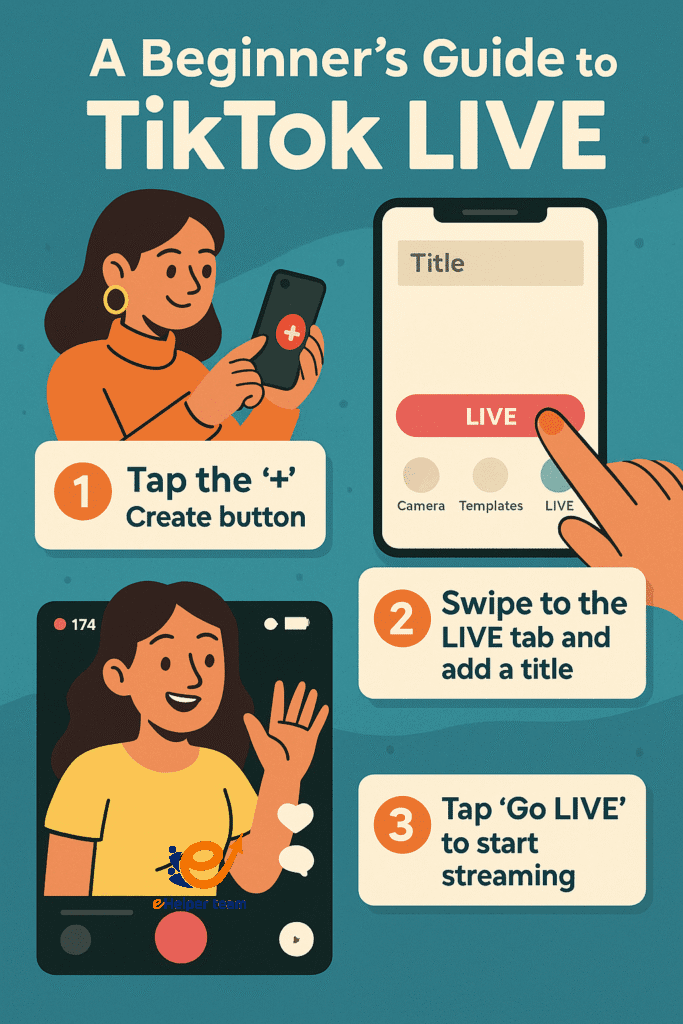
Once eligible, follow these simple steps:
Open the TikTok app
Tap the “+” (Create) button
Swipe to the “LIVE” tab at the bottom
Add a compelling title—this attracts more viewers
Tap “Go LIVE” and start streaming
Pro Tip: Titles with urgency or curiosity work best. For example, “5 Tips to Look Younger LIVE!” or “Ask Me Anything About Travel!”
Boosting Your Confidence Before You Go Live
Choosing the Right Time for Maximum Reach
Your timing can make or break your stream. Using insights from this strategy guide for social media management, you can plan streams around peak engagement times for your target audience.
Preparing Your Background and Setup
Ensure good lighting, a clean background, and clear audio. Test your camera and internet connection beforehand to avoid technical issues.
What to Do on a Live Stream to Keep It Interesting
Fun Ideas for Your First Few Streams
Not sure what to do on a live stream? Here are some ideas:
Q&A Sessions
Product or book reviews
Cooking or hobby demonstrations
Casual “Life Update” chats
Behind-the-scenes tours
Planning Content Without Script Fatigue
Prepare talking points but avoid reading a script. Natural conversation works better for engagement.
Engaging with Your Audience in Real-Time
Interacting with Comments for Deeper Connection
Reading and responding to comments live makes viewers feel valued. Use their names when replying—it humanizes the experience and builds loyalty.
Managing Trolls and Negative Feedback
Stay calm. You can mute or block disruptive users quickly. Many creators use moderators for support during high-traffic lives.
TikTok Gifts Explained: How They Work and Why They Matter
What Are Gifts and How to Earn Them?
TikTok viewers can send virtual gifts during your stream. These are bought with TikTok coins, which can later be converted to real money.
Gift Value Conversion and Withdrawing Your Earnings
Gifts vary in value. Once collected, you can convert your gift balance into diamonds and then withdraw cash using a connected payment account. TikTok deducts a percentage for platform fees.
Measuring Success After Your Broadcast
Using Analytics to Improve Future Lives
After your stream, check your analytics dashboard for:
Total viewers
Watch duration
Number of gifts received
Peak viewer count
Learn how to analyze these metrics effectively with this helpful TikTok analytics guide.
What Metrics Should You Care About?
Focus on:
Audience retention
Viewer engagement (comments, likes, shares)
Conversion to followers
These show how well you’re resonating with your audience.
Common Mistakes to Avoid on TikTok LIVE
Going Live Without Preparation
Improvising can be fun, but not having a plan can quickly derail your stream. Jot down key points ahead of time.
Ignoring Your Viewers
People leave quickly if they feel ignored. Interacting even briefly makes a big difference.
Expanding Your TikTok LIVE Skills: Fresh Tips & Strategies
1. Running Live Events & Special Themes
Host a live theme night (e.g. “Throwback Tunes Evening” or a “Talent Spotlight Show”). Themed events create excitement and retention.
Collaborate with other creators for joint lives—invite a guest to co-host or appear halfway through.
Use countdown teasers in stories or posts to build anticipation before going live.
2.Leveraging Hashtags & Captions for Discovery
Include trending and specific hashtags in your live title to reach beyond followers.
Add a short caption prior to going live, like: “LIVE in 5 minutes—Q&A about starting a small business?”. This helps TikTok index the broadcast for better discoverability.
3.Interactive Tools During Live Streams
Utilize built-in tools like polls, Q&A stickers, or hashtag prompts to increase participation.
Encourage viewers to request duets or stitch you live—this not only boosts engagement but can be repurposed as content afterward.
4. Real‑World Mini Case Study
Case Study: One creator in their late 30s scheduled weekly “Ask Me Anything” streams at the same time every week. They began with around 1,200 followers and grew to over 5,000 within three months. By engaging consistently and responding to live feedback, their gift earnings increased 3×.
Key tactics used: recurring schedule, inviting viewers to bring questions, using duet requests to build content, and following up with analytics review for improvement.
5.Safety and Privacy Tips During TikTok LIVE
Avoid sharing personal contact information—your live stream is public.
Be cautious when live-contesting followers or asking for location details. Set boundaries politely.
Report or block suspicious behavior immediately. Safety settings and moderators are your allies.
6. Incentivizing Views and Gifts Effectively
Offer mini-challenges: “If we reach 100 gifts in this session, I’ll sing a song” or “First 3 top givers pick the next topic.”
Use thank-you moments where you highlight recent donors by name.
Introduce unique shout-outs (e.g. custom digital art, a thank-you mention in your profile bio for top supporters).
7. Optimizing Retention & Returning Viewers
End each live session with a clear prompt to follow for upcoming lives.
Mention the schedule for your next broadcast and briefly hint at the theme or topic to create anticipation.
Use TikTok Stories to post one-minute recaps of your live—this helps viewers who missed it to feel connected and return next time.
8. Repurposing Live Content into Other Formats
Save your TikTok LIVE and repurpose highlights into short clips for Reels, TikTok posts, or other platforms.
Cross-post screen recordings or snippets on YouTube Shorts, Instagram, or Facebook to extend reach and drive more followers back to your next live.
Summary of Additions (New Insights Only)
| New Section or Strategy | Purpose |
|---|---|
| Themed Live Events & Collaboration | Increases excitement, audience retention, and reach |
| Hashtags & Captions Optimization | Improves discoverability and viewer growth |
| Interactive Tools & Viewership Actions | Boosts engagement and real-time participation |
| Real-world Case Study | Demonstrates practical success for target audience |
| Privacy & Safety Guidelines | Protects both you and your viewers |
| Gift Incentives & Engagement Techniques | Encourages gift giving with personalized interactions |
| Retention & Returning Viewers Strategy | Builds a loyal audience base over time |
| Content Repurposing Techniques | Expands reach across platforms and drives future growth |

FAQs About Going Live on TikTok
Q1: What are the basic requirements to go live on TikTok?
You need 1,000 followers and be 18+ to receive gifts.
Q2: How do I attract more viewers to my TikTok LIVE?
Use engaging titles, go live at peak times, and promote your live session beforehand.
Q3: Can I earn money directly from my TikTok LIVE streams?
Yes, through virtual gifts that are convertible to real cash.
Q4: What should I avoid doing during a live broadcast?
Avoid ignoring comments, being unprepared, or violating community guidelines.
Q5: How can I track my performance after a live stream?
Use TikTok’s built-in analytics to monitor key metrics and improve your next stream.
Final Thoughts and Call to Action
Going live on TikTok is one of the most accessible ways to grow your brand, share your knowledge, or just have fun with a global audience. With the right setup and mindset, you’ll not only enjoy the process—you might even start earning real money from your streams.
Want to take things up a notch? Explore interactive tools like Duet and Stitch by checking this practical TikTok growth guide before your next broadcast.


